

We recommend that you create an incremental artifact when you need to apply changes to a subset of files in an artifact, where the size of the original artifact is significantly larger.
Create new artifact versions from scratch
There are two ways to create a new artifact version: from a single run and from distributed runs. They are defined as follows:- Single run: A single run provides all the data for a new version. This is the most common case and is best suited when the run fully recreates the needed data. For example: outputting saved models or model predictions in a table for analysis.
- Distributed runs: A set of runs collectively provides all the data for a new version. This is best suited for distributed jobs which have multiple runs generating data, often in parallel. For example: evaluating a model in a distributed manner, and outputting the predictions.
v0 alias if you pass a name to the wandb.Artifact API that does not exist in your project. W&B checksums the contents when you log again to the same artifact. If the artifact changed, W&B saves a new version v1.
W&B will retrieve an existing artifact if you pass a name and artifact type to the wandb.Artifact API that matches an existing artifact in your project. The retrieved artifact will have a version greater than 1.
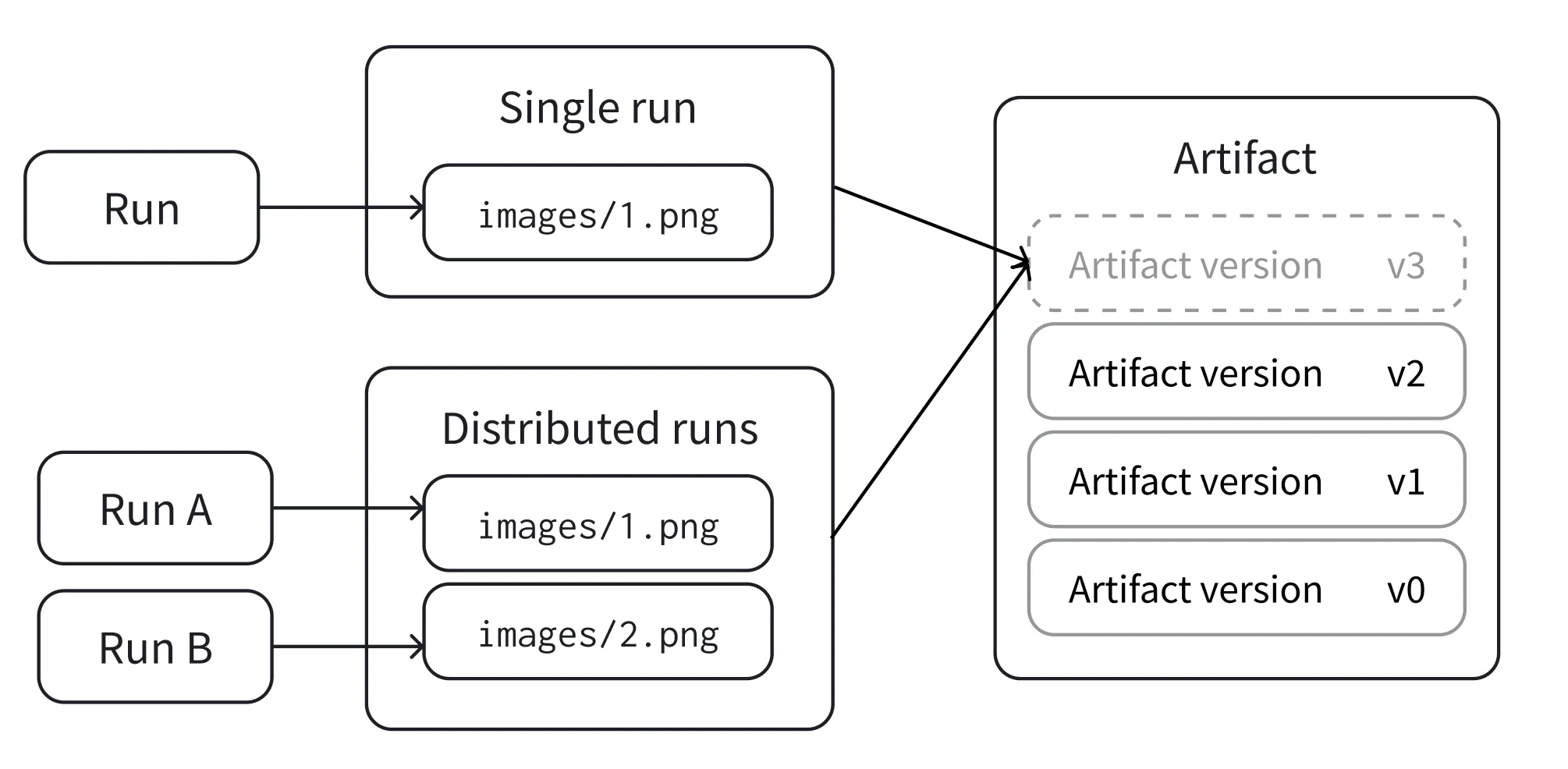
Single run
Log a new version of an Artifact with a single run that produces all the files in the artifact. This case occurs when a single run produces all the files in the artifact. Based on your use case, select one of the tabs below to create a new artifact version:- Track as run output
- Save directly
Use
wandb.Run.log_artifact() to explicitly associate the artifact with a run:- Create a run with
wandb.init(). - Create a new artifact or retrieve an existing one with
wandb.Artifact. - Add files to the artifact with
wandb.Artifact.add_file(). - Log the artifact to the run with
wandb.Run.log_artifact().
Distributed runs
Allow a collection of runs to collaborate on a version before committing it. This is in contrast to single run mode described above where one run provides all the data for a new version.- Each run in the collection needs to be aware of the same unique ID (called
distributed_id) in order to collaborate on the same version. By default, if present, W&B uses the run’sgroupas set bywandb.init(group=GROUP)as thedistributed_id. - There must be a final run that “commits” the version, permanently locking its state.
- Use
upsert_artifactto add to the collaborative artifact andfinish_artifactto finalize the commit.
upsert_artifact.
Run 1
Run 2
Run 3
Must run after Run 1 and Run 2 complete. The Run that callswandb.Run.finish_artifact() can include files in the artifact, but does not need to.
Create a new artifact version from an existing version
Create a new artifact version by adding, modifying, or removing files from an existing artifact version. W&B re-indexes only the files that changed. The resulting version is known as an incremental artifact.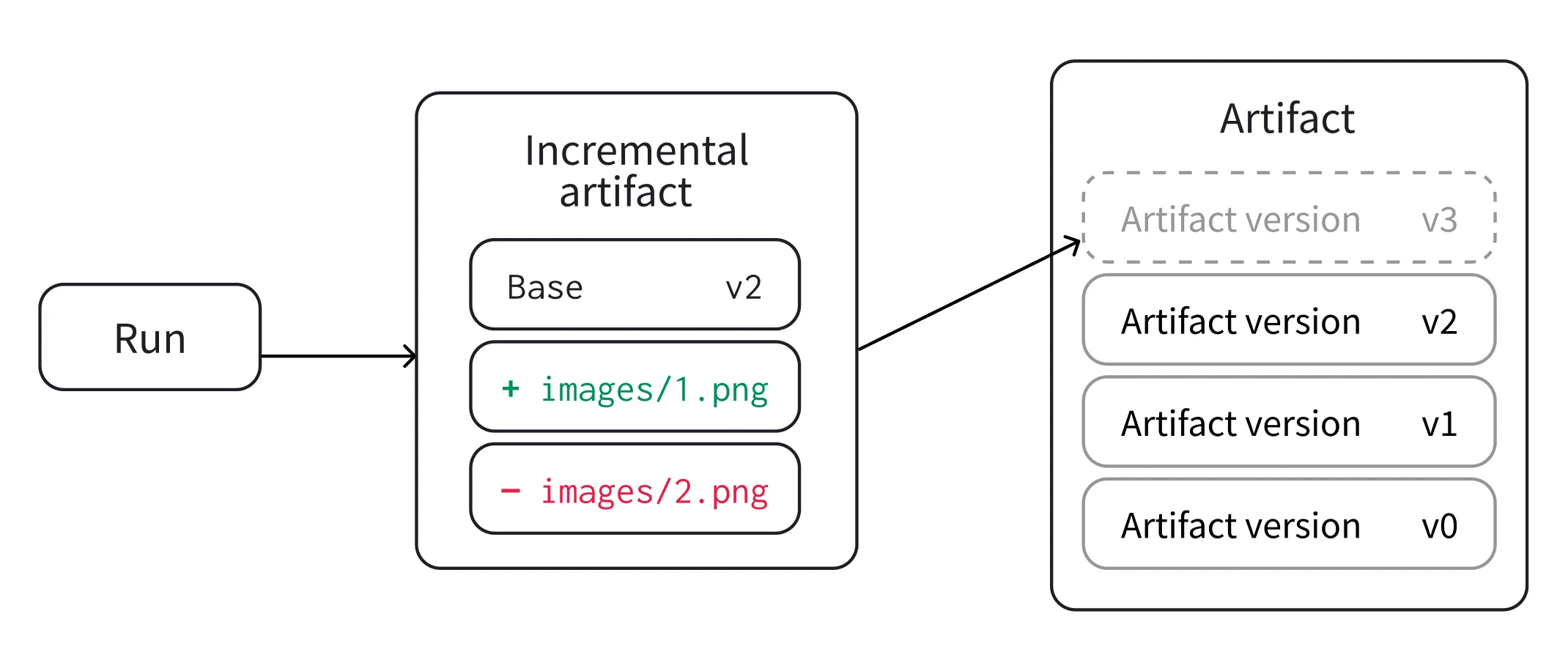
Artifact.add_file(), Artifact.add_dir(), and Artifact.remove(). For a complete list of methods, see the Artifact reference documentation.
After you finish modifying the draft, log or save it to create a new artifact version.
You can create a new artifact from scratch instead of creating an incremental artifact. However, this approach requires all artifact files to be available on your local disk. With an incremental artifact, you can add, remove, or modify individual files while reusing unchanged files from the previous artifact version.
Single run
- Track as run input
- Fetch directly
Use
wandb.Run.use_artifact() when the current run consumes the artifact. W&B records the artifact as an input to the run.- Retrieve the artifact version with
wandb.Run.use_artifact(). - Create a draft with
Artifact.new_draft(). - Add, remove, or modify entries in the draft.
- Log the draft with
wandb.Run.log_artifact()to create a new artifact version.
Distributed runs
UseArtifact.upsert_artifact() and Artifact.finish_artifact() when multiple runs contribute files to one artifact version.
The following example shows how to create a new artifact version from distributed runs in the case where the artifact is used as an input to the runs. The same approach applies when the artifact is fetched directly with the Public API.